> For the complete documentation index, see [llms.txt](https://gis.govstack.global/llms.txt). Markdown versions of documentation pages are available by appending `.md` to page URLs; this page is available as [Markdown](https://gis.govstack.global/development-14/9-workflows.md).
# 9 Internal Workflows
This section provides a detailed view of how this Building Block will interact with other Building Blocks to support common use cases.
The following internal workflows describe the processes the GIS Building Block executes to fulfill a request from an external application or Building Block to meet the functional requirements stated in Section 6 of this specification. In the current scope, examples are drawn from the user-journey steps of the use-cases of the GIS-Based Incident Management System and Land Records/Cadaster Management provided in Section 2. The below common preconditions should be met before utilizing the GIS BB Services:
* **Information Mediator BB Configuration**: All the service endpoints of the GIS BB APIs should be configured in the Information Mediator BB.
* **Conformance to Open Standards:** Developers of the GIS BB APIs should adhere to the [OGC web API guidelines and principles](https://github.com/opengeospatial/OGC-Web-API-Guidelines), and Cross-Origin Resource Sharing (CORS) to enable seamless integration and data exchange of GIS data between GIS BB APIs and GIS API services offered by other systems.
* **Data Format Compatibility:** The geospatial data source handled by the GIS BB APIs, whether vector data (points, lines, and polygons) or raster data (imagery, elevation data), should be in a format compatible with the specific API used (e.g., GeoJSON, GML, KML, etc.) per Section 7 of this specification. External adapters may be used to transform non-compliant data formats and exchange protocols to become compatible with Section 7 Apis.
* **Coordinate System Awareness:** Developers and users should understand the coordinate system and projections used in their geospatial data to prevent inaccuracies in analysis and visualization.
* **No Authentication or API Keys:** As a general rule, developers of the GIS BB APIs should avoid mandatory authentication mechanisms or API keys that can limit access; make the API accessible to anyone without a signup process unless there is a legitimate requirement to impose authentication mechanisms.
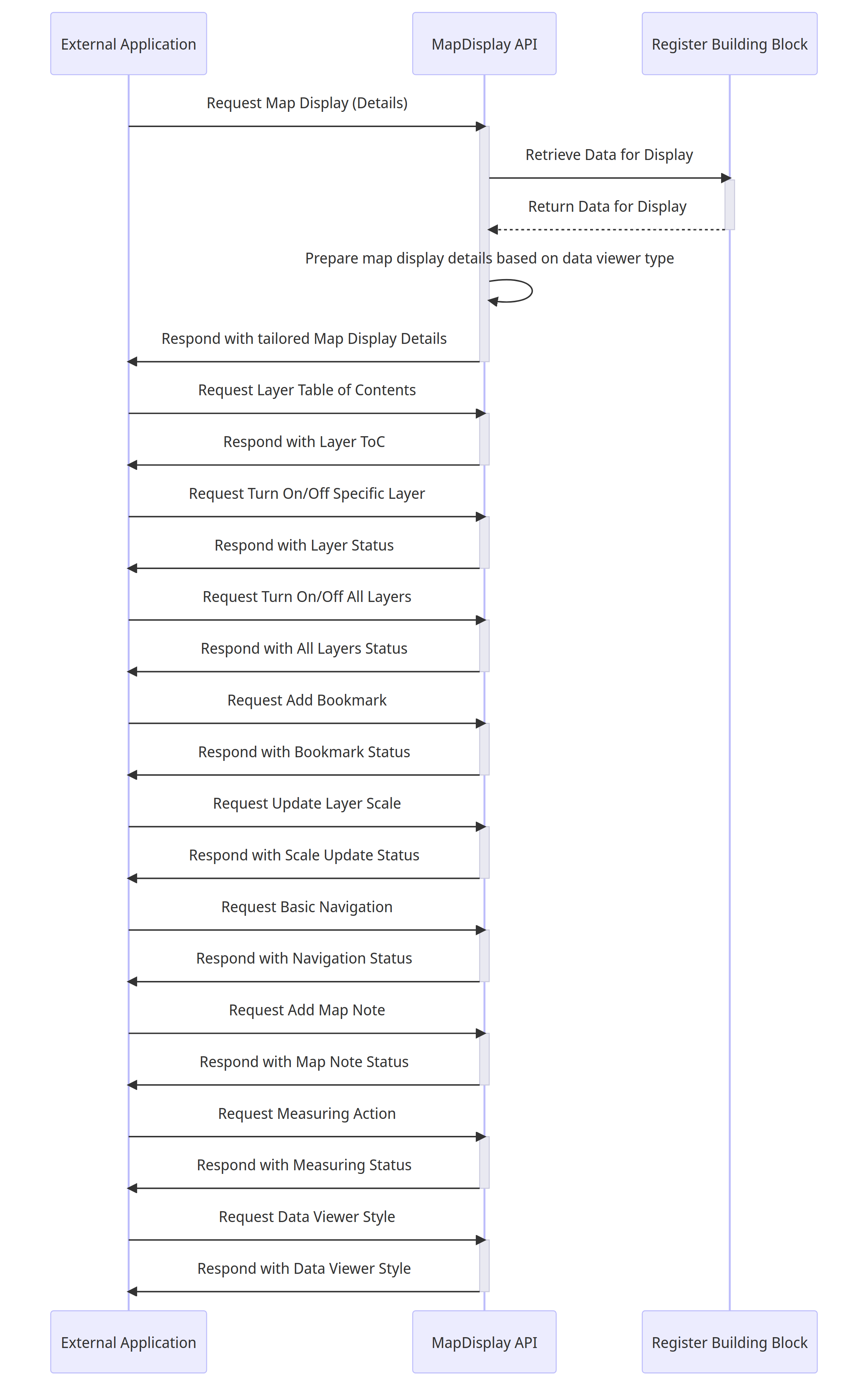
### 9.1 GIS Map Display
#### 9.1.1 Interactions between an external application or a Building Block and the MapDisplay API with data store integration
{% @mermaid/diagram content="sequenceDiagram
participant ExternalApp as External Application
participant MapDisplayAPI as MapDisplay API
participant RegisterBB as Register Building Block
ExternalApp->>+MapDisplayAPI: Request Map Display (Details)
MapDisplayAPI->>+RegisterBB: Retrieve Data for Display
RegisterBB-->>-MapDisplayAPI: Return Data for Display
MapDisplayAPI->>MapDisplayAPI: Prepare map display details based on data viewer type
MapDisplayAPI->>-ExternalApp: Respond with tailored Map Display Details
ExternalApp->>+MapDisplayAPI: Request Layer Table of Contents
MapDisplayAPI->>-ExternalApp: Respond with Layer ToC
ExternalApp->>+MapDisplayAPI: Request Turn On/Off Specific Layer
MapDisplayAPI->>-ExternalApp: Respond with Layer Status
ExternalApp->>+MapDisplayAPI: Request Turn On/Off All Layers
MapDisplayAPI->>-ExternalApp: Respond with All Layers Status
ExternalApp->>+MapDisplayAPI: Request Add Bookmark
MapDisplayAPI->>-ExternalApp: Respond with Bookmark Status
ExternalApp->>+MapDisplayAPI: Request Update Layer Scale
MapDisplayAPI->>-ExternalApp: Respond with Scale Update Status
ExternalApp->>+MapDisplayAPI: Request Basic Navigation
MapDisplayAPI->>-ExternalApp: Respond with Navigation Status
ExternalApp->>+MapDisplayAPI: Request Add Map Note
MapDisplayAPI->>-ExternalApp: Respond with Map Note Status
ExternalApp->>+MapDisplayAPI: Request Measuring Action
MapDisplayAPI->>-ExternalApp: Respond with Measuring Status
ExternalApp->>+MapDisplayAPI: Request Data Viewer Style
MapDisplayAPI->>-ExternalApp: Respond with Data Viewer Style
" %}
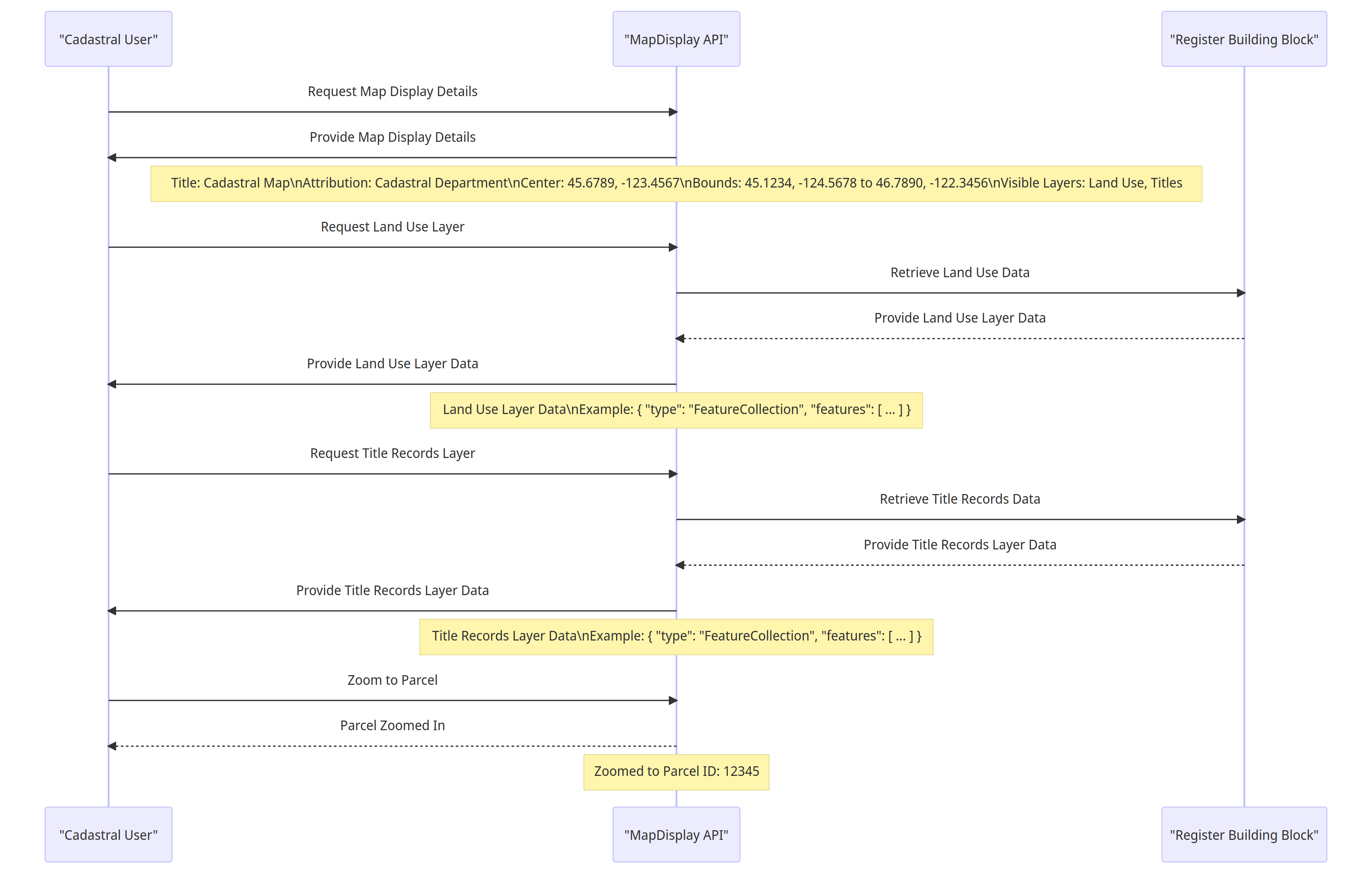
#### 9.1.2 Example 1: Cadastral User Displaying Land Use and Title Layers with Parcel Zoom
{% @mermaid/diagram content="sequenceDiagram
participant ExternalApp as "Cadastral User"
participant MapDisplayAPI as "MapDisplay API"
participant RegisterBB as "Register Building Block"
ExternalApp ->> MapDisplayAPI: Request Map Display Details
MapDisplayAPI ->> ExternalApp: Provide Map Display Details
Note over MapDisplayAPI: Title: Cadastral Map\nAttribution: Cadastral Department\nCenter: 45.6789, -123.4567\nBounds: 45.1234, -124.5678 to 46.7890, -122.3456\nVisible Layers: Land Use, Titles
ExternalApp ->> MapDisplayAPI: Request Land Use Layer
MapDisplayAPI ->> RegisterBB: Retrieve Land Use Data
RegisterBB -->> MapDisplayAPI: Provide Land Use Layer Data
MapDisplayAPI ->> ExternalApp: Provide Land Use Layer Data
Note over MapDisplayAPI: Land Use Layer Data\nExample: { "type": "FeatureCollection", "features": \[ ... ] }
ExternalApp ->> MapDisplayAPI: Request Title Records Layer
MapDisplayAPI ->> RegisterBB: Retrieve Title Records Data
RegisterBB -->> MapDisplayAPI: Provide Title Records Layer Data
MapDisplayAPI ->> ExternalApp: Provide Title Records Layer Data
Note over MapDisplayAPI: Title Records Layer Data\nExample: { "type": "FeatureCollection", "features": \[ ... ] }
ExternalApp ->> MapDisplayAPI: Zoom to Parcel
MapDisplayAPI -->> ExternalApp: Parcel Zoomed In
Note over MapDisplayAPI: Zoomed to Parcel ID: 12345
" %}
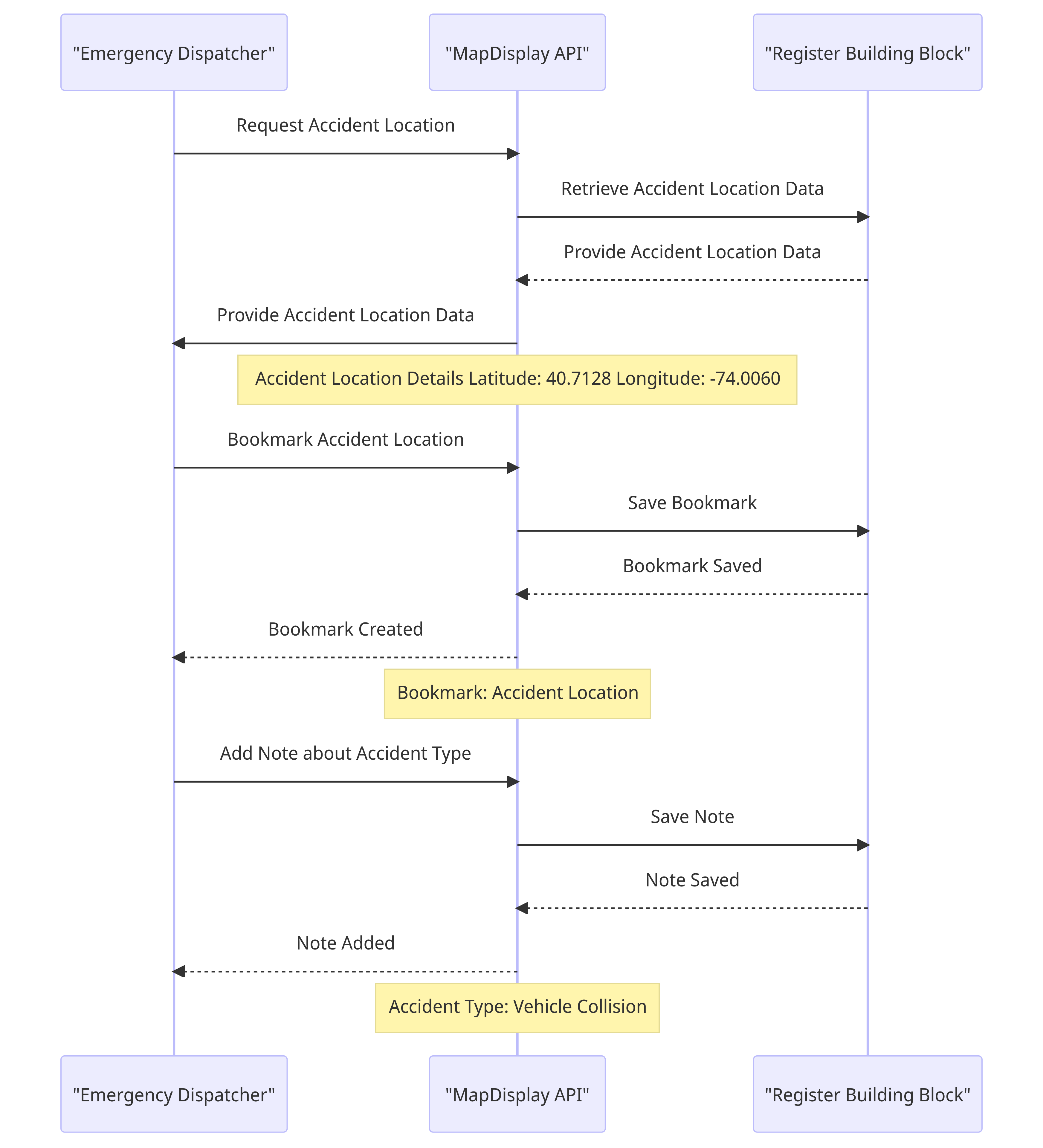
#### 9.1.3 Example 2: Emergency Dispatcher: Accident Location Bookmarking and Map Note Addition
{% @mermaid/diagram content="sequenceDiagram
participant Dispatcher as "Emergency Dispatcher"
participant MapDisplayAPI as "MapDisplay API"
participant RegisterBB as "Register Building Block"
Dispatcher ->> MapDisplayAPI: Request Accident Location
MapDisplayAPI ->> RegisterBB: Retrieve Accident Location Data
RegisterBB -->> MapDisplayAPI: Provide Accident Location Data
MapDisplayAPI ->> Dispatcher: Provide Accident Location Data
Note over MapDisplayAPI: Accident Location Details Latitude: 40.7128 Longitude: -74.0060
Dispatcher ->> MapDisplayAPI: Bookmark Accident Location
MapDisplayAPI ->> RegisterBB: Save Bookmark
RegisterBB -->> MapDisplayAPI: Bookmark Saved
MapDisplayAPI -->> Dispatcher: Bookmark Created
Note over MapDisplayAPI: Bookmark: Accident Location
Dispatcher ->> MapDisplayAPI: Add Note about Accident Type
MapDisplayAPI ->> RegisterBB: Save Note
RegisterBB -->> MapDisplayAPI: Note Saved
MapDisplayAPI -->> Dispatcher: Note Added
Note over MapDisplayAPI: Accident Type: Vehicle Collision
" %}
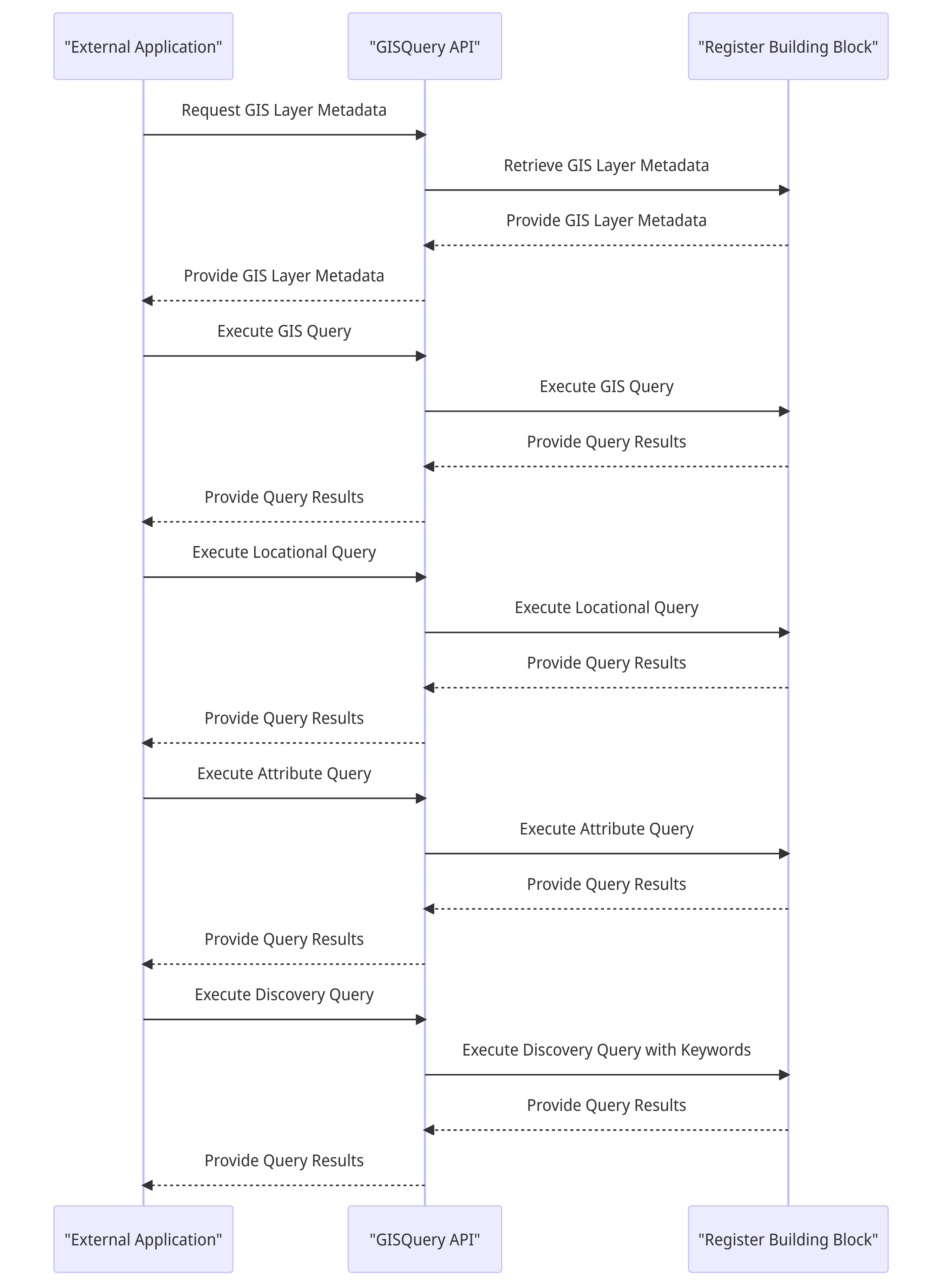
### 9.2 GIS Query
#### 9.2.1 Interactions between an external application or a Building Block and the GISQuery API with data store integrationsequenceDiagram
{% @mermaid/diagram content="sequenceDiagram
participant ExternalApp as "External Application"
participant GISQueryAPI as "GISQuery API"
participant RegisterBB as "Register Building Block"
ExternalApp ->> GISQueryAPI: Request GIS Layer Metadata
GISQueryAPI ->> RegisterBB: Retrieve GIS Layer Metadata
RegisterBB -->> GISQueryAPI: Provide GIS Layer Metadata
GISQueryAPI -->> ExternalApp: Provide GIS Layer Metadata
ExternalApp ->> GISQueryAPI: Execute GIS Query
GISQueryAPI ->> RegisterBB: Execute GIS Query
RegisterBB -->> GISQueryAPI: Provide Query Results
GISQueryAPI -->> ExternalApp: Provide Query Results
ExternalApp ->> GISQueryAPI: Execute Locational Query
GISQueryAPI ->> RegisterBB: Execute Locational Query
RegisterBB -->> GISQueryAPI: Provide Query Results
GISQueryAPI -->> ExternalApp: Provide Query Results
ExternalApp ->> GISQueryAPI: Execute Attribute Query
GISQueryAPI ->> RegisterBB: Execute Attribute Query
RegisterBB -->> GISQueryAPI: Provide Query Results
GISQueryAPI -->> ExternalApp: Provide Query Results
ExternalApp ->> GISQueryAPI: Execute Discovery Query
GISQueryAPI ->> RegisterBB: Execute Discovery Query with Keywords
RegisterBB -->> GISQueryAPI: Provide Query Results
GISQueryAPI -->> ExternalApp: Provide Query Results
" %}
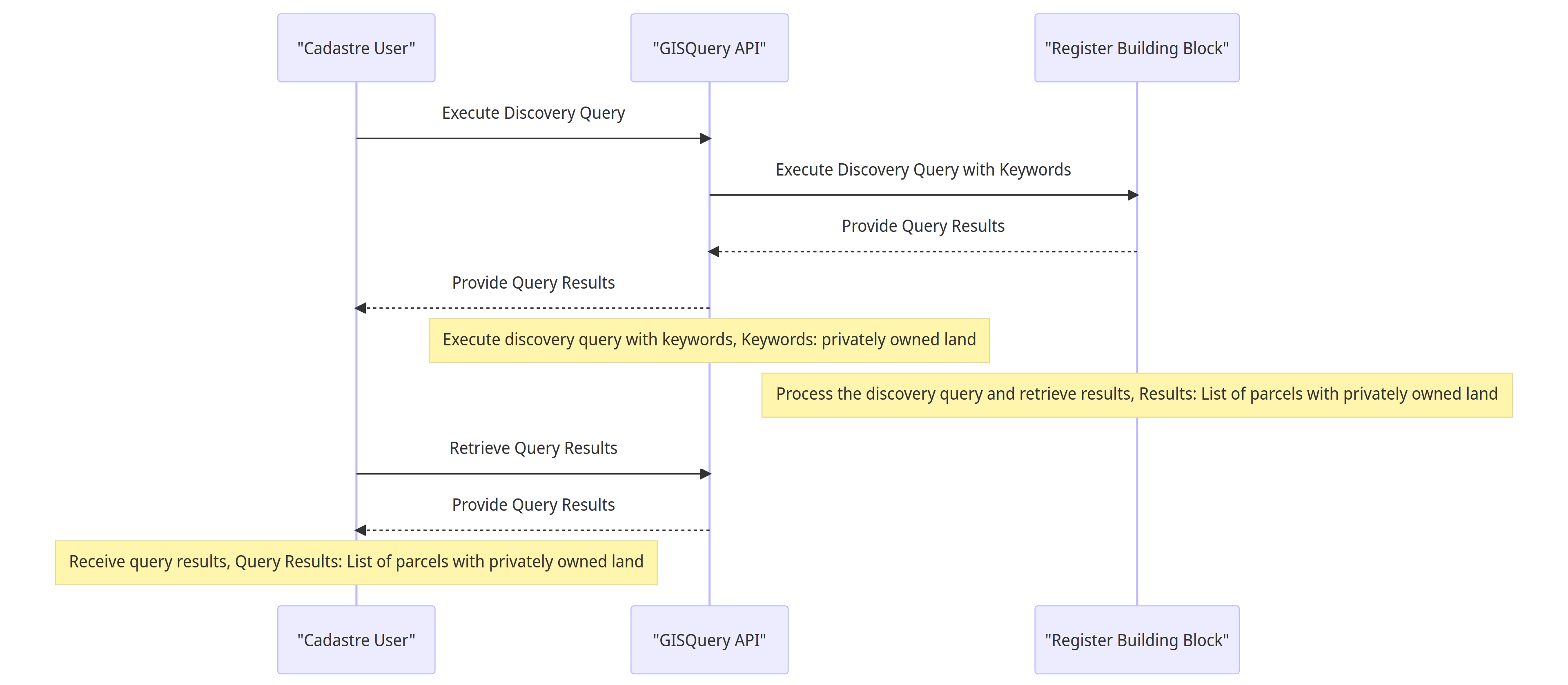
#### 9.2.2 Example 1: Cadastre User Discovery Query for Privately Owned Land
{% @mermaid/diagram content="sequenceDiagram
participant ExternalApp as "Cadastre User"
participant GISQueryAPI as "GISQuery API"
participant RegisterBB as "Register Building Block"
ExternalApp ->> GISQueryAPI: Execute Discovery Query
GISQueryAPI ->> RegisterBB: Execute Discovery Query with Keywords
RegisterBB -->> GISQueryAPI: Provide Query Results
GISQueryAPI -->> ExternalApp: Provide Query Results
Note over GISQueryAPI: Execute discovery query with keywords, Keywords: privately owned land
Note over RegisterBB: Process the discovery query and retrieve results, Results: List of parcels with privately owned land
ExternalApp ->> GISQueryAPI: Retrieve Query Results
GISQueryAPI -->> ExternalApp: Provide Query Results
Note over ExternalApp: Receive query results, Query Results: List of parcels with privately owned land
" %}
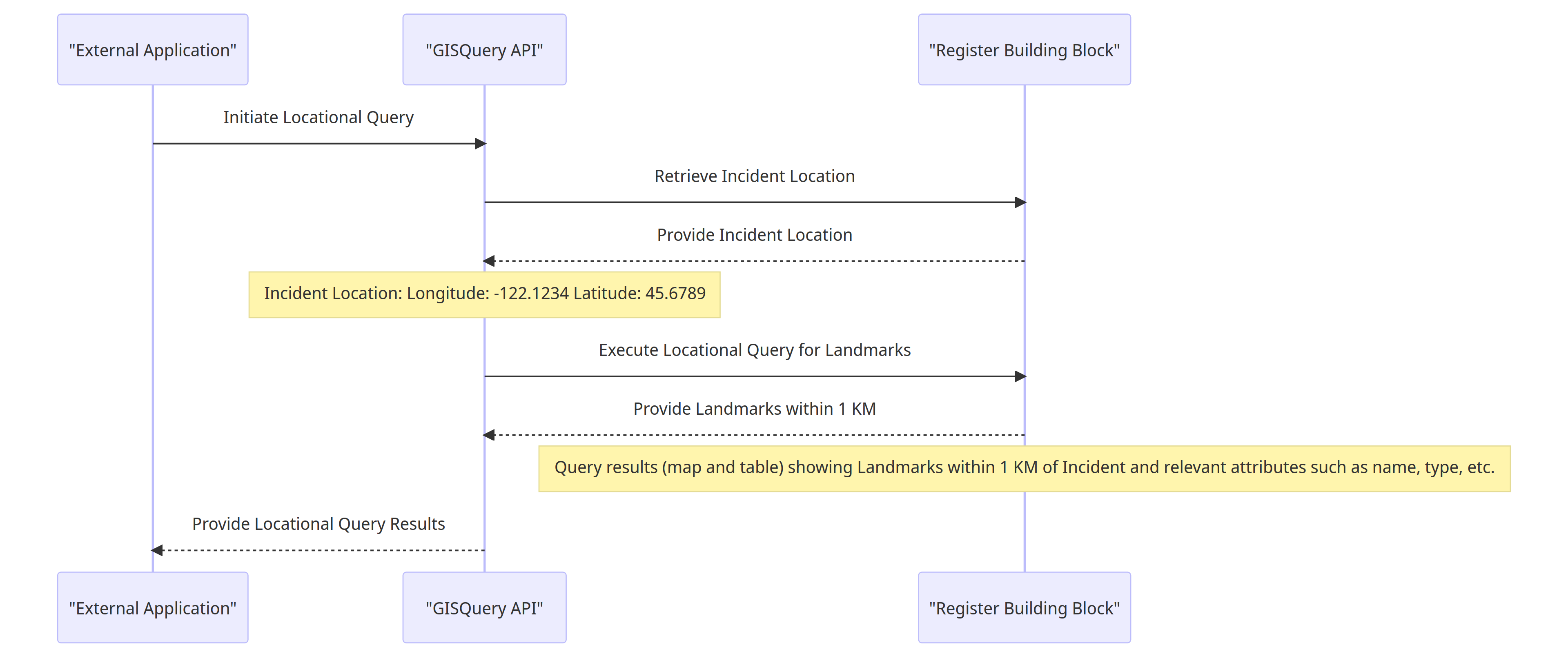
#### 9.2.3 Example 2: Locational Query for Landmarks near Incident Location
{% @mermaid/diagram content="sequenceDiagram
participant ExternalApp as "External Application"
participant GISQueryAPI as "GISQuery API"
participant RegisterBB as "Register Building Block"
ExternalApp ->> GISQueryAPI: Initiate Locational Query
GISQueryAPI ->> RegisterBB: Retrieve Incident Location
RegisterBB -->> GISQueryAPI: Provide Incident Location
Note over GISQueryAPI: Incident Location: Longitude: -122.1234 Latitude: 45.6789
GISQueryAPI ->> RegisterBB: Execute Locational Query for Landmarks
RegisterBB -->> GISQueryAPI: Provide Landmarks within 1 KM
Note over RegisterBB: Query results (map and table) showing Landmarks within 1 KM of Incident and relevant attributes such as name, type, etc.
GISQueryAPI -->> ExternalApp: Provide Locational Query Results
" %}
### 9.3 GIS Data Management
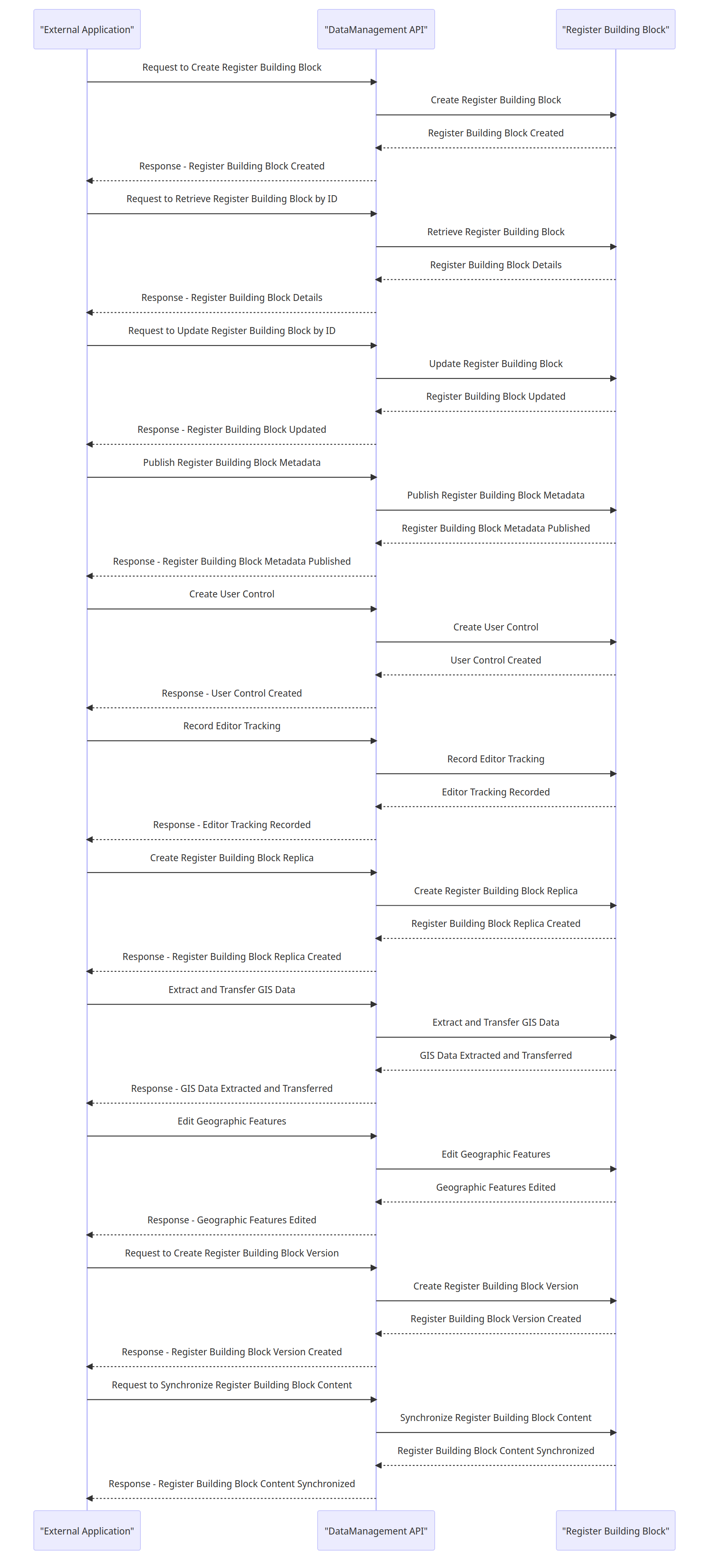
#### 9.3.1 Interactions between an external application or a Building Block and the GIS DataManagement API with data store integration
{% @mermaid/diagram content="sequenceDiagram
participant ExternalApp as "External Application"
participant DataManagementAPI as "DataManagement API"
participant RegisterBB as "Register Building Block"
ExternalApp ->> DataManagementAPI: Request to Create Register Building Block
DataManagementAPI ->> RegisterBB: Create Register Building Block
RegisterBB -->> DataManagementAPI: Register Building Block Created
DataManagementAPI -->> ExternalApp: Response - Register Building Block Created
ExternalApp ->> DataManagementAPI: Request to Retrieve Register Building Block by ID
DataManagementAPI ->> RegisterBB: Retrieve Register Building Block
RegisterBB -->> DataManagementAPI: Register Building Block Details
DataManagementAPI -->> ExternalApp: Response - Register Building Block Details
ExternalApp ->> DataManagementAPI: Request to Update Register Building Block by ID
DataManagementAPI ->> RegisterBB: Update Register Building Block
RegisterBB -->> DataManagementAPI: Register Building Block Updated
DataManagementAPI -->> ExternalApp: Response - Register Building Block Updated
ExternalApp ->> DataManagementAPI: Publish Register Building Block Metadata
DataManagementAPI ->> RegisterBB: Publish Register Building Block Metadata
RegisterBB -->> DataManagementAPI: Register Building Block Metadata Published
DataManagementAPI -->> ExternalApp: Response - Register Building Block Metadata Published
ExternalApp ->> DataManagementAPI: Create User Control
DataManagementAPI ->> RegisterBB: Create User Control
RegisterBB -->> DataManagementAPI: User Control Created
DataManagementAPI -->> ExternalApp: Response - User Control Created
ExternalApp ->> DataManagementAPI: Record Editor Tracking
DataManagementAPI ->> RegisterBB: Record Editor Tracking
RegisterBB -->> DataManagementAPI: Editor Tracking Recorded
DataManagementAPI -->> ExternalApp: Response - Editor Tracking Recorded
ExternalApp ->> DataManagementAPI: Create Register Building Block Replica
DataManagementAPI ->> RegisterBB: Create Register Building Block Replica
RegisterBB -->> DataManagementAPI: Register Building Block Replica Created
DataManagementAPI -->> ExternalApp: Response - Register Building Block Replica Created
ExternalApp ->> DataManagementAPI: Extract and Transfer GIS Data
DataManagementAPI ->> RegisterBB: Extract and Transfer GIS Data
RegisterBB -->> DataManagementAPI: GIS Data Extracted and Transferred
DataManagementAPI -->> ExternalApp: Response - GIS Data Extracted and Transferred
ExternalApp ->> DataManagementAPI: Edit Geographic Features
DataManagementAPI ->> RegisterBB: Edit Geographic Features
RegisterBB -->> DataManagementAPI: Geographic Features Edited
DataManagementAPI -->> ExternalApp: Response - Geographic Features Edited
ExternalApp ->> DataManagementAPI: Request to Create Register Building Block Version
DataManagementAPI ->> RegisterBB: Create Register Building Block Version
RegisterBB -->> DataManagementAPI: Register Building Block Version Created
DataManagementAPI -->> ExternalApp: Response - Register Building Block Version Created
ExternalApp ->> DataManagementAPI: Request to Synchronize Register Building Block Content
DataManagementAPI ->> RegisterBB: Synchronize Register Building Block Content
RegisterBB -->> DataManagementAPI: Register Building Block Content Synchronized
DataManagementAPI -->> ExternalApp: Response - Register Building Block Content Synchronized
" %}
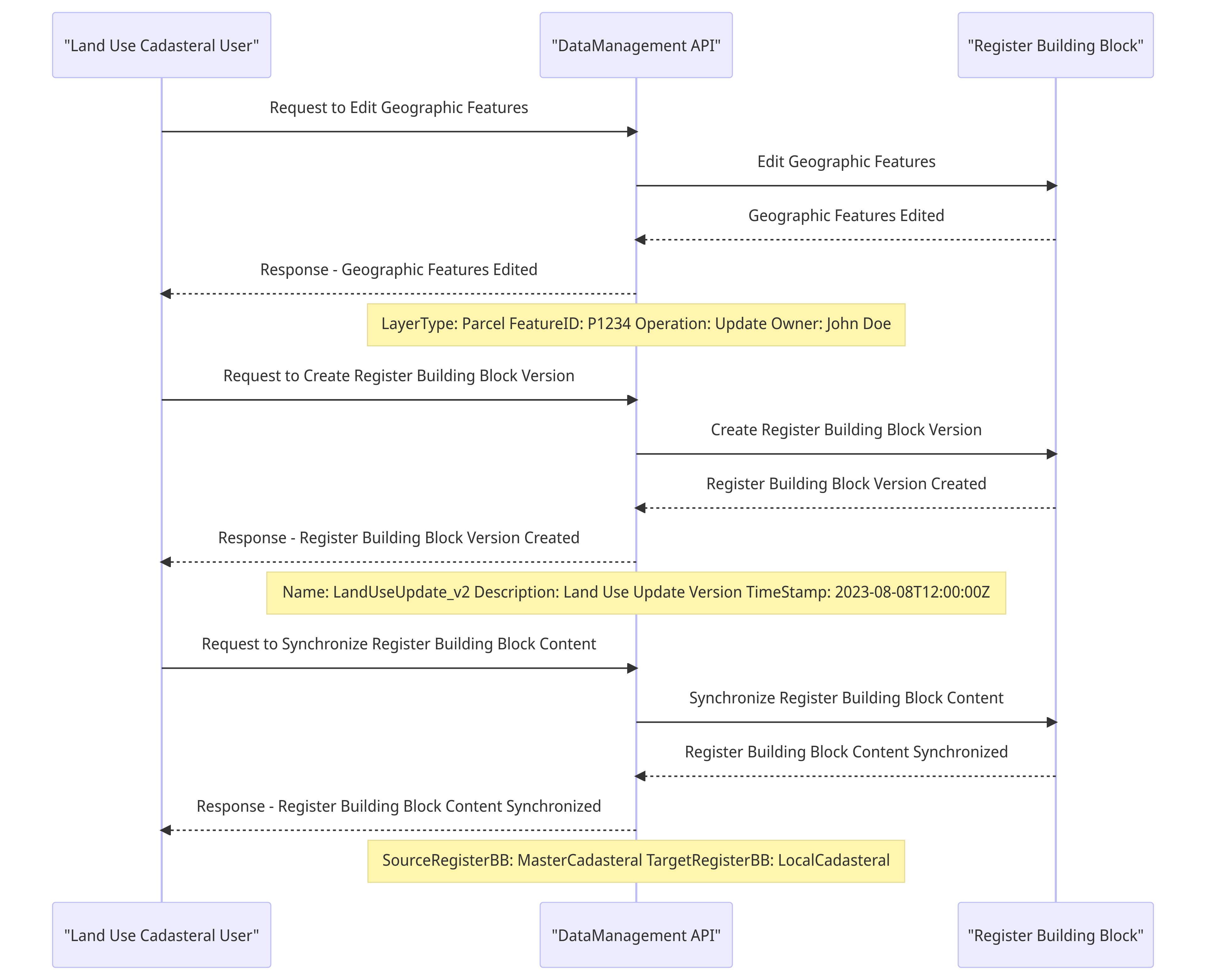
#### 9.3.2 Example: Editing Land Parcel information
{% @mermaid/diagram content="sequenceDiagram
participant LandUseCadastralUser as "Land Use Cadasteral User"
participant DataManagementAPI as "DataManagement API"
participant RegisterBB as "Register Building Block"
LandUseCadastralUser ->> DataManagementAPI: Request to Edit Geographic Features
DataManagementAPI ->> RegisterBB: Edit Geographic Features
RegisterBB -->> DataManagementAPI: Geographic Features Edited
DataManagementAPI -->> LandUseCadastralUser: Response - Geographic Features Edited
Note over DataManagementAPI: LayerType: Parcel FeatureID: P1234 Operation: Update Owner: John Doe
LandUseCadastralUser ->> DataManagementAPI: Request to Create Register Building Block Version
DataManagementAPI ->> RegisterBB: Create Register Building Block Version
RegisterBB -->> DataManagementAPI: Register Building Block Version Created
DataManagementAPI -->> LandUseCadastralUser: Response - Register Building Block Version Created
Note over DataManagementAPI: Name: LandUseUpdate\_v2 Description: Land Use Update Version TimeStamp: 2023-08-08T12:00:00Z
LandUseCadastralUser ->> DataManagementAPI: Request to Synchronize Register Building Block Content
DataManagementAPI ->> RegisterBB: Synchronize Register Building Block Content
RegisterBB -->> DataManagementAPI: Register Building Block Content Synchronized
DataManagementAPI -->> LandUseCadastralUser: Response - Register Building Block Content Synchronized
Note over DataManagementAPI: SourceRegisterBB: MasterCadasteral TargetRegisterBB: LocalCadasteral
" %}
### 9.4 GeoCoding and Reverse GeoCoding
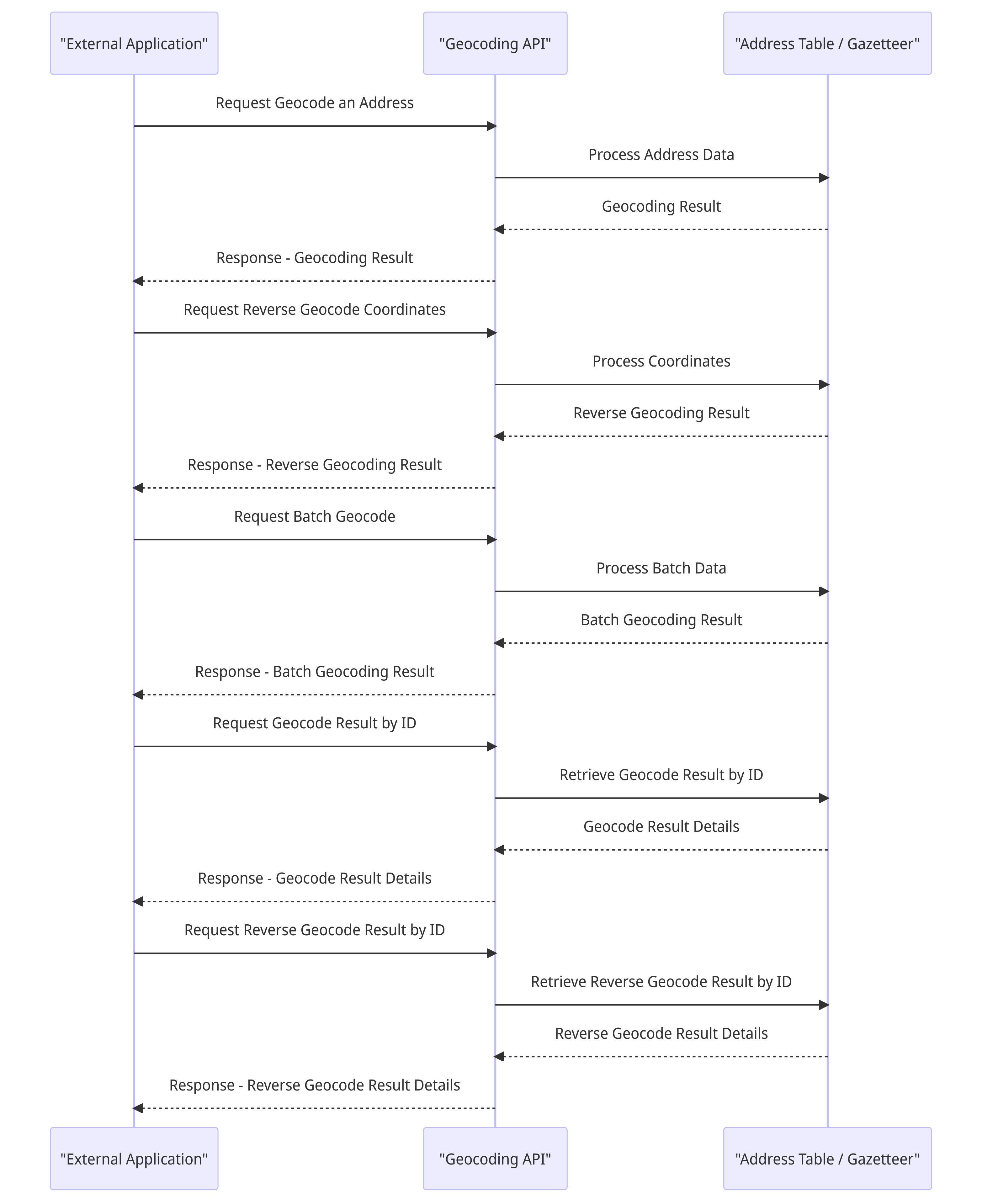
#### 9.4.1 Geocoding and Reverse Geocoding API Integration with Data Store
{% @mermaid/diagram content="sequenceDiagram
participant ExternalApp as "External Application"
participant GeocodingAPI as "Geocoding API"
participant DataStore as "Address Table / Gazetteer"
ExternalApp ->> GeocodingAPI: Request Geocode an Address
GeocodingAPI ->> DataStore: Process Address Data
DataStore -->> GeocodingAPI: Geocoding Result
GeocodingAPI -->> ExternalApp: Response - Geocoding Result
ExternalApp ->> GeocodingAPI: Request Reverse Geocode Coordinates
GeocodingAPI ->> DataStore: Process Coordinates
DataStore -->> GeocodingAPI: Reverse Geocoding Result
GeocodingAPI -->> ExternalApp: Response - Reverse Geocoding Result
ExternalApp ->> GeocodingAPI: Request Batch Geocode
GeocodingAPI ->> DataStore: Process Batch Data
DataStore -->> GeocodingAPI: Batch Geocoding Result
GeocodingAPI -->> ExternalApp: Response - Batch Geocoding Result
ExternalApp ->> GeocodingAPI: Request Geocode Result by ID
GeocodingAPI ->> DataStore: Retrieve Geocode Result by ID
DataStore -->> GeocodingAPI: Geocode Result Details
GeocodingAPI -->> ExternalApp: Response - Geocode Result Details
ExternalApp ->> GeocodingAPI: Request Reverse Geocode Result by ID
GeocodingAPI ->> DataStore: Retrieve Reverse Geocode Result by ID
DataStore -->> GeocodingAPI: Reverse Geocode Result Details
GeocodingAPI -->> ExternalApp: Response - Reverse Geocode Result Details
" %}
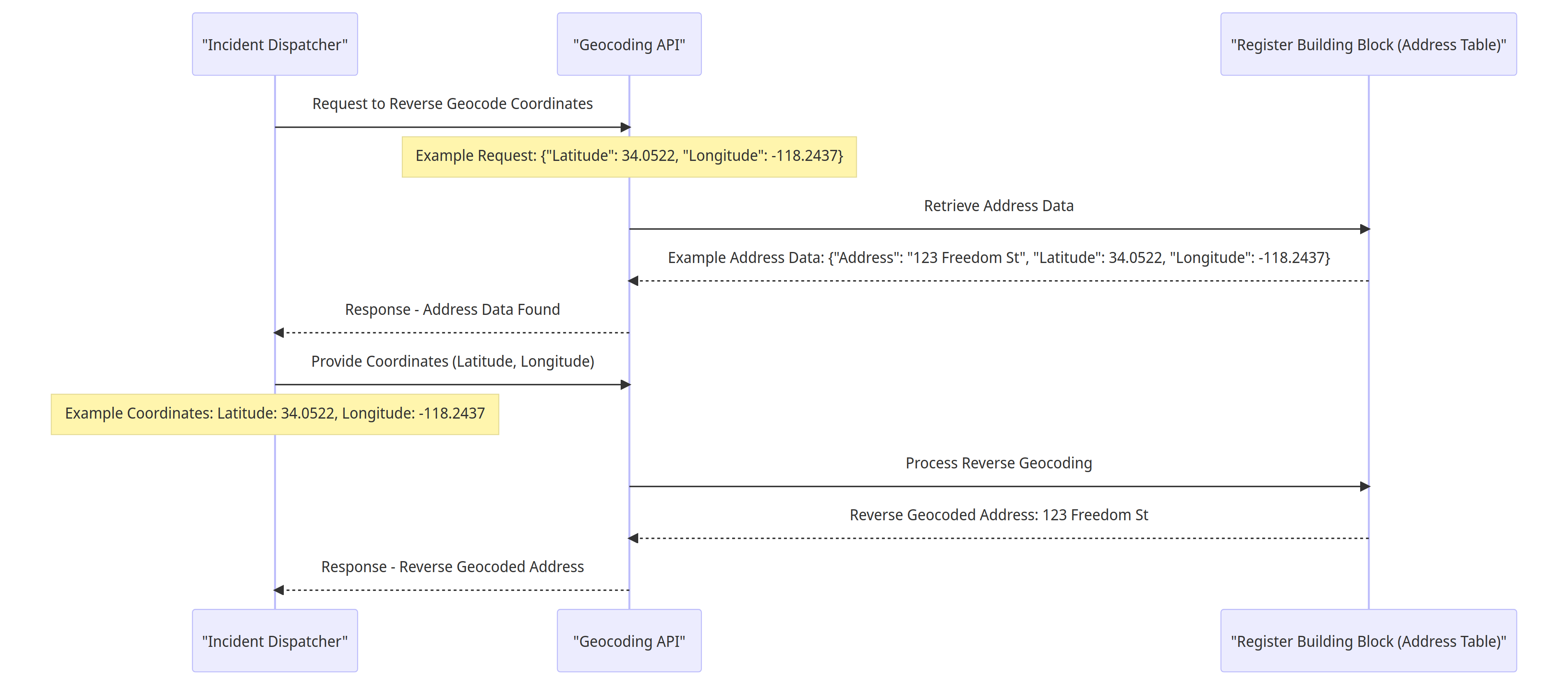
#### 9.4.2 Example: Reverse Geocoding of Incident Dispatcher's Landmark Coordinates
{% @mermaid/diagram content="sequenceDiagram
participant ExternalApp as "Incident Dispatcher"
participant GeocodingAPI as "Geocoding API"
participant RegisterBB as "Register Building Block (Address Table)"
ExternalApp ->> GeocodingAPI: Request to Reverse Geocode Coordinates
Note over GeocodingAPI: Example Request: {"Latitude": 34.0522, "Longitude": -118.2437}
GeocodingAPI ->> RegisterBB: Retrieve Address Data
RegisterBB -->> GeocodingAPI: Example Address Data: {"Address": "123 Freedom St", "Latitude": 34.0522, "Longitude": -118.2437}
GeocodingAPI -->> ExternalApp: Response - Address Data Found
ExternalApp ->> GeocodingAPI: Provide Coordinates (Latitude, Longitude)
Note over ExternalApp: Example Coordinates: Latitude: 34.0522, Longitude: -118.2437
GeocodingAPI ->> RegisterBB: Process Reverse Geocoding
RegisterBB -->> GeocodingAPI: Reverse Geocoded Address: 123 Freedom St
GeocodingAPI -->> ExternalApp: Response - Reverse Geocoded Address
" %}
### 9.5 Spatial Awareness and Analysis
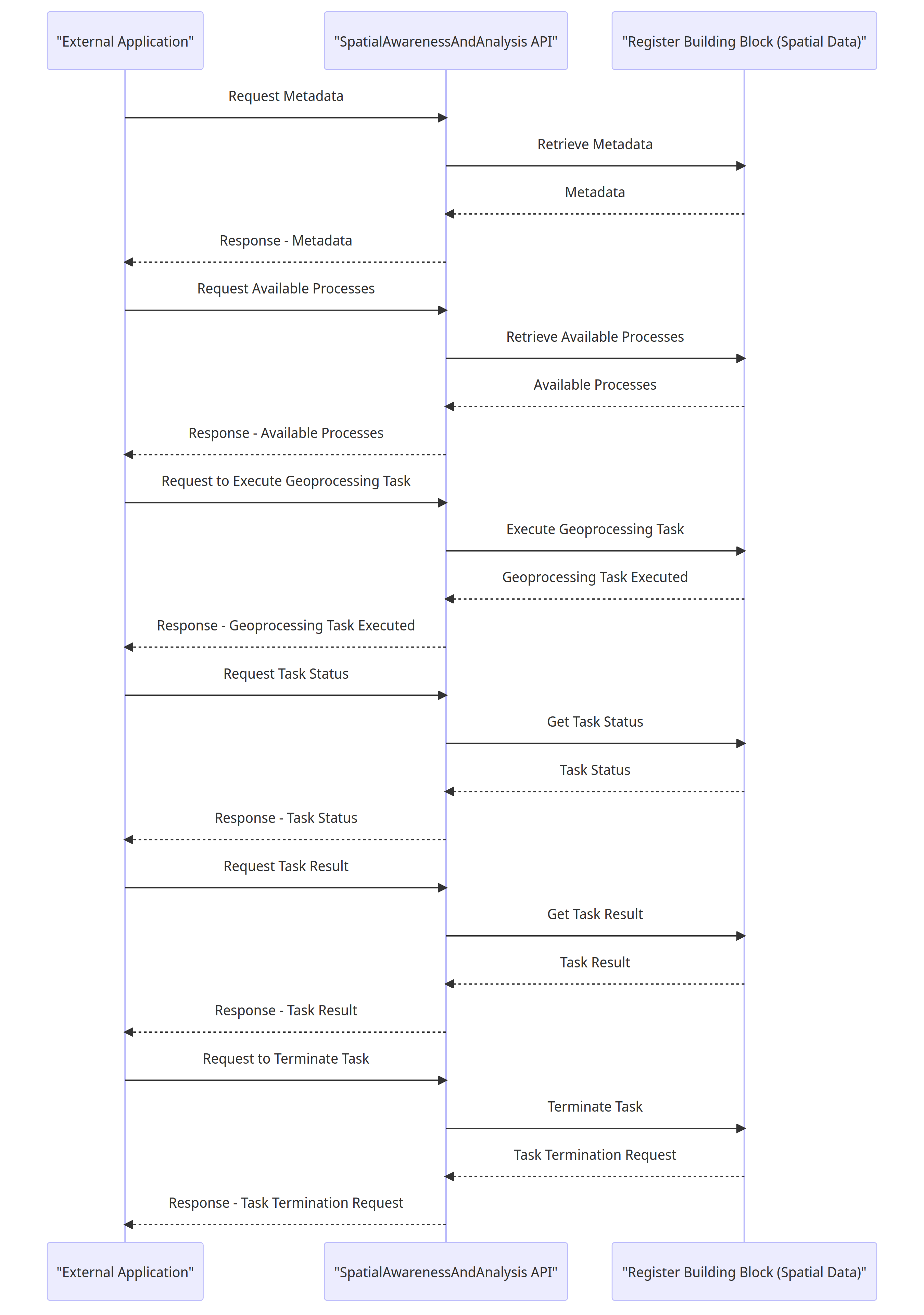
#### 9.5.1 Interactions between an external application or a Building Block and the SpatialAwarenessAndAnalysis API with data store integration
{% @mermaid/diagram content="sequenceDiagram
participant ExternalApp as "External Application"
participant SpatialAwarenessAPI as "SpatialAwarenessAndAnalysis API"
participant RegisterBB as "Register Building Block (Spatial Data)"
ExternalApp ->> SpatialAwarenessAPI: Request Metadata
SpatialAwarenessAPI ->> RegisterBB: Retrieve Metadata
RegisterBB -->> SpatialAwarenessAPI: Metadata
SpatialAwarenessAPI -->> ExternalApp: Response - Metadata
ExternalApp ->> SpatialAwarenessAPI: Request Available Processes
SpatialAwarenessAPI ->> RegisterBB: Retrieve Available Processes
RegisterBB -->> SpatialAwarenessAPI: Available Processes
SpatialAwarenessAPI -->> ExternalApp: Response - Available Processes
ExternalApp ->> SpatialAwarenessAPI: Request to Execute Geoprocessing Task
SpatialAwarenessAPI ->> RegisterBB: Execute Geoprocessing Task
RegisterBB -->> SpatialAwarenessAPI: Geoprocessing Task Executed
SpatialAwarenessAPI -->> ExternalApp: Response - Geoprocessing Task Executed
ExternalApp ->> SpatialAwarenessAPI: Request Task Status
SpatialAwarenessAPI ->> RegisterBB: Get Task Status
RegisterBB -->> SpatialAwarenessAPI: Task Status
SpatialAwarenessAPI -->> ExternalApp: Response - Task Status
ExternalApp ->> SpatialAwarenessAPI: Request Task Result
SpatialAwarenessAPI ->> RegisterBB: Get Task Result
RegisterBB -->> SpatialAwarenessAPI: Task Result
SpatialAwarenessAPI -->> ExternalApp: Response - Task Result
ExternalApp ->> SpatialAwarenessAPI: Request to Terminate Task
SpatialAwarenessAPI ->> RegisterBB: Terminate Task
RegisterBB -->> SpatialAwarenessAPI: Task Termination Request
SpatialAwarenessAPI -->> ExternalApp: Response - Task Termination Request
" %}
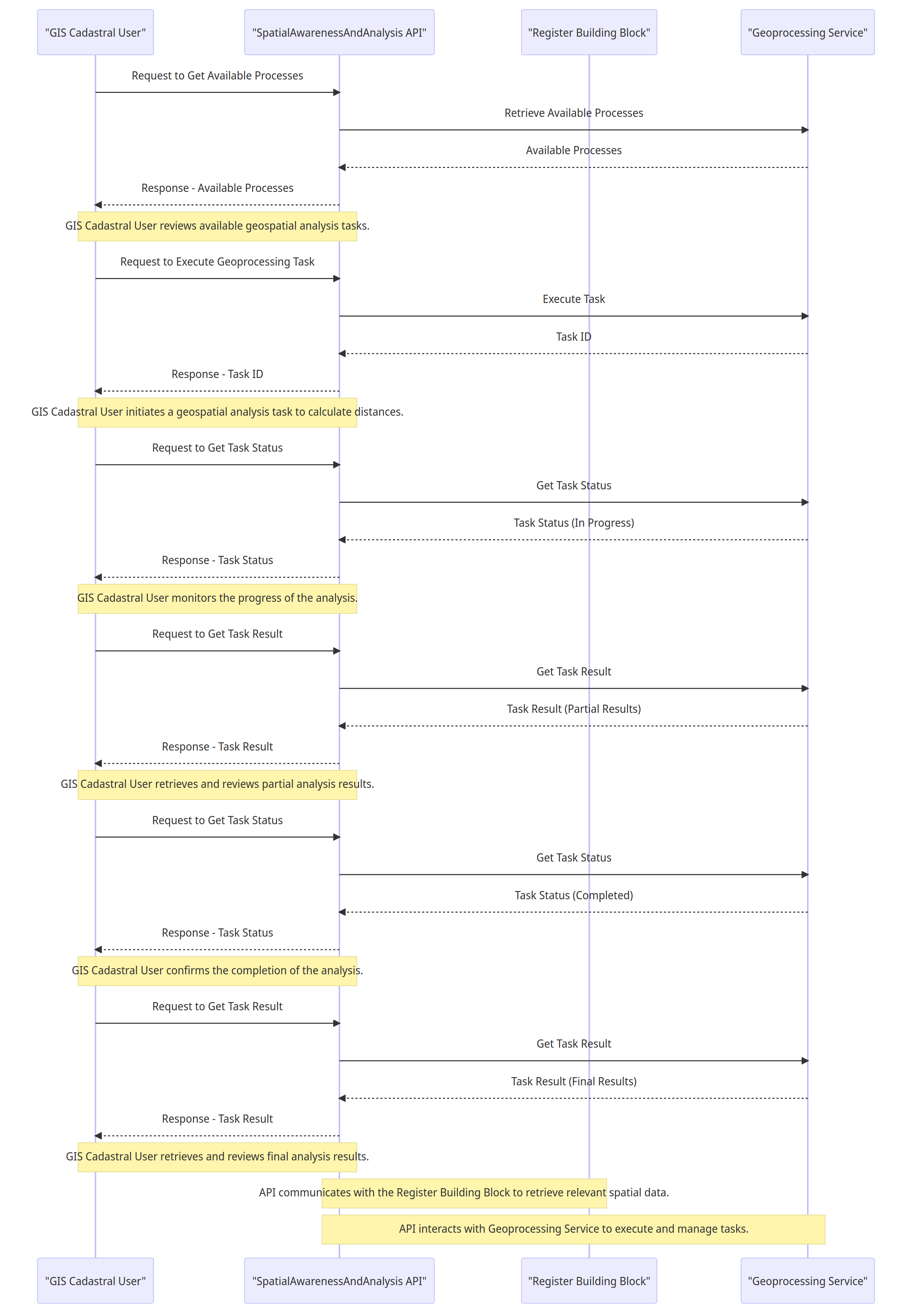
#### 9.5.2 Example 1: GIS Cadastral User Performing Green Space Analysis
{% @mermaid/diagram content="sequenceDiagram
participant User as "GIS Cadastral User"
participant API as "SpatialAwarenessAndAnalysis API"
participant RegisterBB as "Register Building Block"
participant GeoprocessingService as "Geoprocessing Service"
User ->> API: Request to Get Available Processes
API ->> GeoprocessingService: Retrieve Available Processes
GeoprocessingService -->> API: Available Processes
API -->> User: Response - Available Processes
note over User, API: GIS Cadastral User reviews available geospatial analysis tasks.
User ->> API: Request to Execute Geoprocessing Task
API ->> GeoprocessingService: Execute Task
GeoprocessingService -->> API: Task ID
API -->> User: Response - Task ID
note over User, API: GIS Cadastral User initiates a geospatial analysis task to calculate distances.
User ->> API: Request to Get Task Status
API ->> GeoprocessingService: Get Task Status
GeoprocessingService -->> API: Task Status (In Progress)
API -->> User: Response - Task Status
note over User, API: GIS Cadastral User monitors the progress of the analysis.
User ->> API: Request to Get Task Result
API ->> GeoprocessingService: Get Task Result
GeoprocessingService -->> API: Task Result (Partial Results)
API -->> User: Response - Task Result
note over User, API: GIS Cadastral User retrieves and reviews partial analysis results.
User ->> API: Request to Get Task Status
API ->> GeoprocessingService: Get Task Status
GeoprocessingService -->> API: Task Status (Completed)
API -->> User: Response - Task Status
note over User, API: GIS Cadastral User confirms the completion of the analysis.
User ->> API: Request to Get Task Result
API ->> GeoprocessingService: Get Task Result
GeoprocessingService -->> API: Task Result (Final Results)
API -->> User: Response - Task Result
note over User, API: GIS Cadastral User retrieves and reviews final analysis results.
note over API, RegisterBB: API communicates with the Register Building Block to retrieve relevant spatial data.
note over API, GeoprocessingService: API interacts with Geoprocessing Service to execute and manage tasks.
" %}
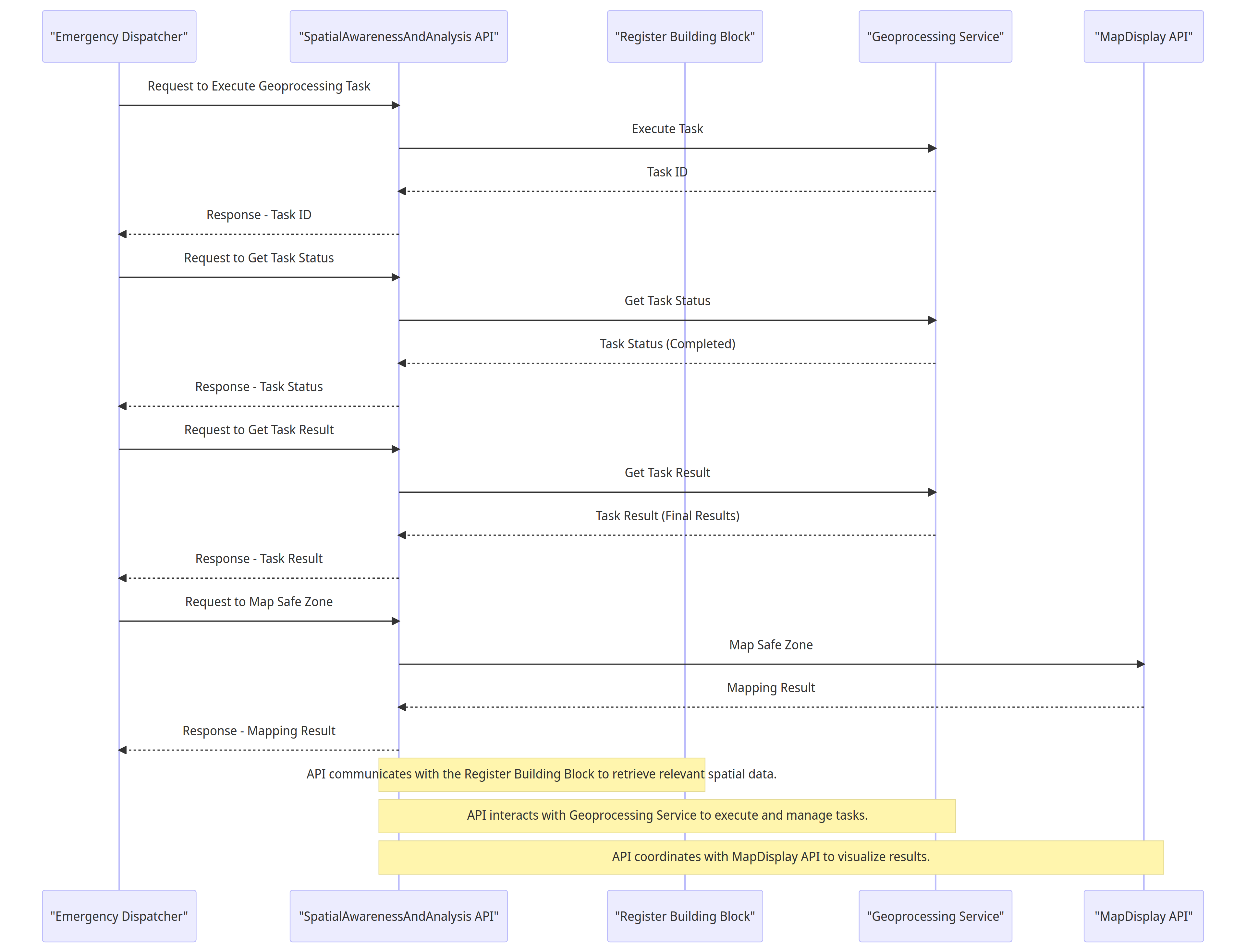
#### 9.5.3 Example 2: Emergency Dispatcher Creating Safe Zone Buffer Around an Incident Spot
{% @mermaid/diagram content="sequenceDiagram
participant Dispatcher as "Emergency Dispatcher"
participant API as "SpatialAwarenessAndAnalysis API"
participant RegisterBB as "Register Building Block"
participant GeoprocessingService as "Geoprocessing Service"
participant MapDisplayAPI as "MapDisplay API"
Dispatcher ->> API: Request to Execute Geoprocessing Task
API ->> GeoprocessingService: Execute Task
GeoprocessingService -->> API: Task ID
API -->> Dispatcher: Response - Task ID
Dispatcher ->> API: Request to Get Task Status
API ->> GeoprocessingService: Get Task Status
GeoprocessingService -->> API: Task Status (Completed)
API -->> Dispatcher: Response - Task Status
Dispatcher ->> API: Request to Get Task Result
API ->> GeoprocessingService: Get Task Result
GeoprocessingService -->> API: Task Result (Final Results)
API -->> Dispatcher: Response - Task Result
Dispatcher ->> API: Request to Map Safe Zone
API ->> MapDisplayAPI: Map Safe Zone
MapDisplayAPI -->> API: Mapping Result
API -->> Dispatcher: Response - Mapping Result
note over API, RegisterBB: API communicates with the Register Building Block to retrieve relevant spatial data.
note over API, GeoprocessingService: API interacts with Geoprocessing Service to execute and manage tasks.
note over API, MapDisplayAPI: API coordinates with MapDisplay API to visualize results.
" %}
### 9.6 GIS Reporting
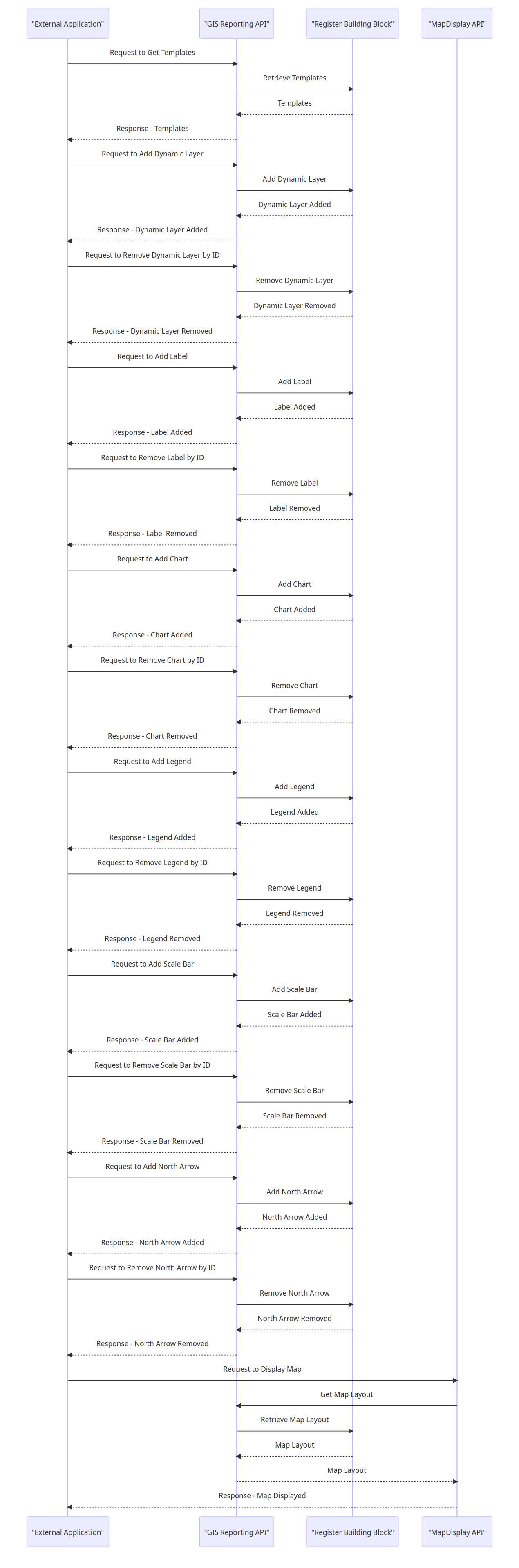
#### 9.6.1 Interactions between an external application or a Building Block and the GIS Reporting API with data store integration
{% @mermaid/diagram content="sequenceDiagram
participant ExternalApp as "External Application"
participant GISReportingAPI as "GIS Reporting API"
participant RegisterBB as "Register Building Block"
participant MapDisplayAPI as "MapDisplay API"
ExternalApp ->> GISReportingAPI: Request to Get Templates
GISReportingAPI ->> RegisterBB: Retrieve Templates
RegisterBB -->> GISReportingAPI: Templates
GISReportingAPI -->> ExternalApp: Response - Templates
ExternalApp ->> GISReportingAPI: Request to Add Dynamic Layer
GISReportingAPI ->> RegisterBB: Add Dynamic Layer
RegisterBB -->> GISReportingAPI: Dynamic Layer Added
GISReportingAPI -->> ExternalApp: Response - Dynamic Layer Added
ExternalApp ->> GISReportingAPI: Request to Remove Dynamic Layer by ID
GISReportingAPI ->> RegisterBB: Remove Dynamic Layer
RegisterBB -->> GISReportingAPI: Dynamic Layer Removed
GISReportingAPI -->> ExternalApp: Response - Dynamic Layer Removed
ExternalApp ->> GISReportingAPI: Request to Add Label
GISReportingAPI ->> RegisterBB: Add Label
RegisterBB -->> GISReportingAPI: Label Added
GISReportingAPI -->> ExternalApp: Response - Label Added
ExternalApp ->> GISReportingAPI: Request to Remove Label by ID
GISReportingAPI ->> RegisterBB: Remove Label
RegisterBB -->> GISReportingAPI: Label Removed
GISReportingAPI -->> ExternalApp: Response - Label Removed
ExternalApp ->> GISReportingAPI: Request to Add Chart
GISReportingAPI ->> RegisterBB: Add Chart
RegisterBB -->> GISReportingAPI: Chart Added
GISReportingAPI -->> ExternalApp: Response - Chart Added
ExternalApp ->> GISReportingAPI: Request to Remove Chart by ID
GISReportingAPI ->> RegisterBB: Remove Chart
RegisterBB -->> GISReportingAPI: Chart Removed
GISReportingAPI -->> ExternalApp: Response - Chart Removed
ExternalApp ->> GISReportingAPI: Request to Add Legend
GISReportingAPI ->> RegisterBB: Add Legend
RegisterBB -->> GISReportingAPI: Legend Added
GISReportingAPI -->> ExternalApp: Response - Legend Added
ExternalApp ->> GISReportingAPI: Request to Remove Legend by ID
GISReportingAPI ->> RegisterBB: Remove Legend
RegisterBB -->> GISReportingAPI: Legend Removed
GISReportingAPI -->> ExternalApp: Response - Legend Removed
ExternalApp ->> GISReportingAPI: Request to Add Scale Bar
GISReportingAPI ->> RegisterBB: Add Scale Bar
RegisterBB -->> GISReportingAPI: Scale Bar Added
GISReportingAPI -->> ExternalApp: Response - Scale Bar Added
ExternalApp ->> GISReportingAPI: Request to Remove Scale Bar by ID
GISReportingAPI ->> RegisterBB: Remove Scale Bar
RegisterBB -->> GISReportingAPI: Scale Bar Removed
GISReportingAPI -->> ExternalApp: Response - Scale Bar Removed
ExternalApp ->> GISReportingAPI: Request to Add North Arrow
GISReportingAPI ->> RegisterBB: Add North Arrow
RegisterBB -->> GISReportingAPI: North Arrow Added
GISReportingAPI -->> ExternalApp: Response - North Arrow Added
ExternalApp ->> GISReportingAPI: Request to Remove North Arrow by ID
GISReportingAPI ->> RegisterBB: Remove North Arrow
RegisterBB -->> GISReportingAPI: North Arrow Removed
GISReportingAPI -->> ExternalApp: Response - North Arrow Removed
ExternalApp ->> MapDisplayAPI: Request to Display Map
MapDisplayAPI ->> GISReportingAPI: Get Map Layout
GISReportingAPI ->> RegisterBB: Retrieve Map Layout
RegisterBB -->> GISReportingAPI: Map Layout
GISReportingAPI -->> MapDisplayAPI: Map Layout
MapDisplayAPI -->> ExternalApp: Response - Map Displayed
" %}
### 9.7 Gefencing
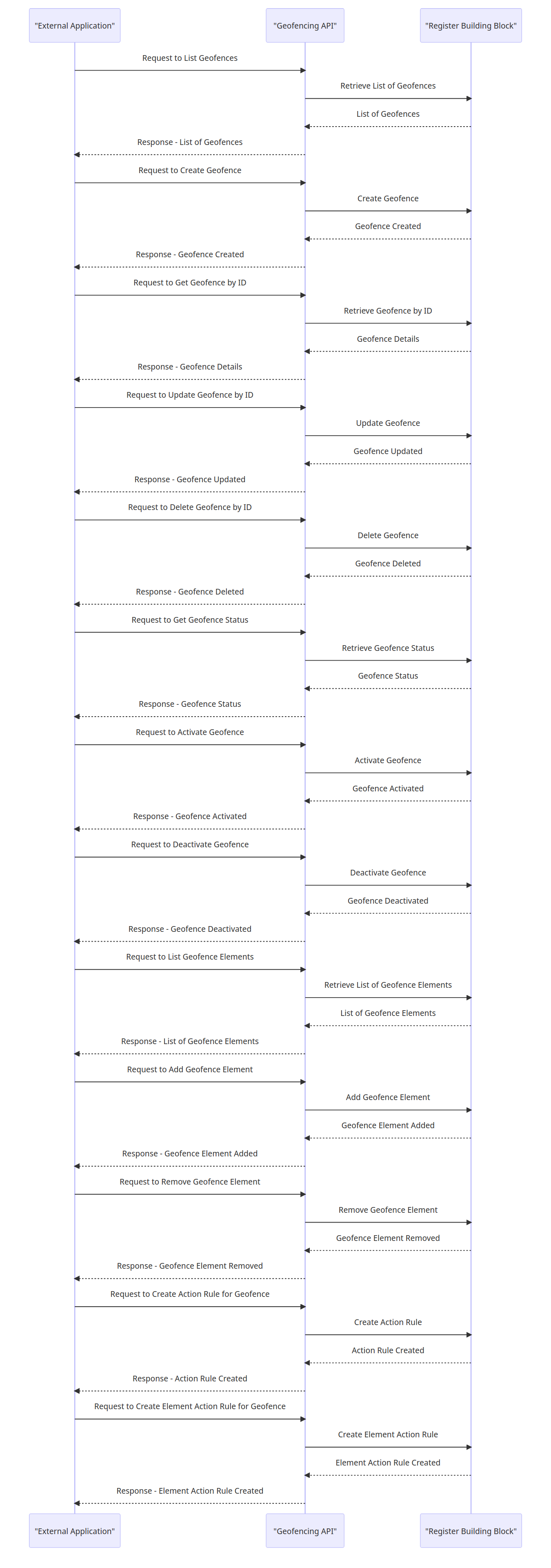
#### 9.7.1 Interactions between an external application or a Building Block and the Geofencing API
{% @mermaid/diagram content="sequenceDiagram
participant ExternalApp as "External Application"
participant GeofencingAPI as "Geofencing API"
participant RegisterBB as "Register Building Block"
ExternalApp ->> GeofencingAPI: Request to List Geofences
GeofencingAPI ->> RegisterBB: Retrieve List of Geofences
RegisterBB -->> GeofencingAPI: List of Geofences
GeofencingAPI -->> ExternalApp: Response - List of Geofences
ExternalApp ->> GeofencingAPI: Request to Create Geofence
GeofencingAPI ->> RegisterBB: Create Geofence
RegisterBB -->> GeofencingAPI: Geofence Created
GeofencingAPI -->> ExternalApp: Response - Geofence Created
ExternalApp ->> GeofencingAPI: Request to Get Geofence by ID
GeofencingAPI ->> RegisterBB: Retrieve Geofence by ID
RegisterBB -->> GeofencingAPI: Geofence Details
GeofencingAPI -->> ExternalApp: Response - Geofence Details
ExternalApp ->> GeofencingAPI: Request to Update Geofence by ID
GeofencingAPI ->> RegisterBB: Update Geofence
RegisterBB -->> GeofencingAPI: Geofence Updated
GeofencingAPI -->> ExternalApp: Response - Geofence Updated
ExternalApp ->> GeofencingAPI: Request to Delete Geofence by ID
GeofencingAPI ->> RegisterBB: Delete Geofence
RegisterBB -->> GeofencingAPI: Geofence Deleted
GeofencingAPI -->> ExternalApp: Response - Geofence Deleted
ExternalApp ->> GeofencingAPI: Request to Get Geofence Status
GeofencingAPI ->> RegisterBB: Retrieve Geofence Status
RegisterBB -->> GeofencingAPI: Geofence Status
GeofencingAPI -->> ExternalApp: Response - Geofence Status
ExternalApp ->> GeofencingAPI: Request to Activate Geofence
GeofencingAPI ->> RegisterBB: Activate Geofence
RegisterBB -->> GeofencingAPI: Geofence Activated
GeofencingAPI -->> ExternalApp: Response - Geofence Activated
ExternalApp ->> GeofencingAPI: Request to Deactivate Geofence
GeofencingAPI ->> RegisterBB: Deactivate Geofence
RegisterBB -->> GeofencingAPI: Geofence Deactivated
GeofencingAPI -->> ExternalApp: Response - Geofence Deactivated
ExternalApp ->> GeofencingAPI: Request to List Geofence Elements
GeofencingAPI ->> RegisterBB: Retrieve List of Geofence Elements
RegisterBB -->> GeofencingAPI: List of Geofence Elements
GeofencingAPI -->> ExternalApp: Response - List of Geofence Elements
ExternalApp ->> GeofencingAPI: Request to Add Geofence Element
GeofencingAPI ->> RegisterBB: Add Geofence Element
RegisterBB -->> GeofencingAPI: Geofence Element Added
GeofencingAPI -->> ExternalApp: Response - Geofence Element Added
ExternalApp ->> GeofencingAPI: Request to Remove Geofence Element
GeofencingAPI ->> RegisterBB: Remove Geofence Element
RegisterBB -->> GeofencingAPI: Geofence Element Removed
GeofencingAPI -->> ExternalApp: Response - Geofence Element Removed
ExternalApp ->> GeofencingAPI: Request to Create Action Rule for Geofence
GeofencingAPI ->> RegisterBB: Create Action Rule
RegisterBB -->> GeofencingAPI: Action Rule Created
GeofencingAPI -->> ExternalApp: Response - Action Rule Created
ExternalApp ->> GeofencingAPI: Request to Create Element Action Rule for Geofence
GeofencingAPI ->> RegisterBB: Create Element Action Rule
RegisterBB -->> GeofencingAPI: Element Action Rule Created
GeofencingAPI -->> ExternalApp: Response - Element Action Rule Created
" %}
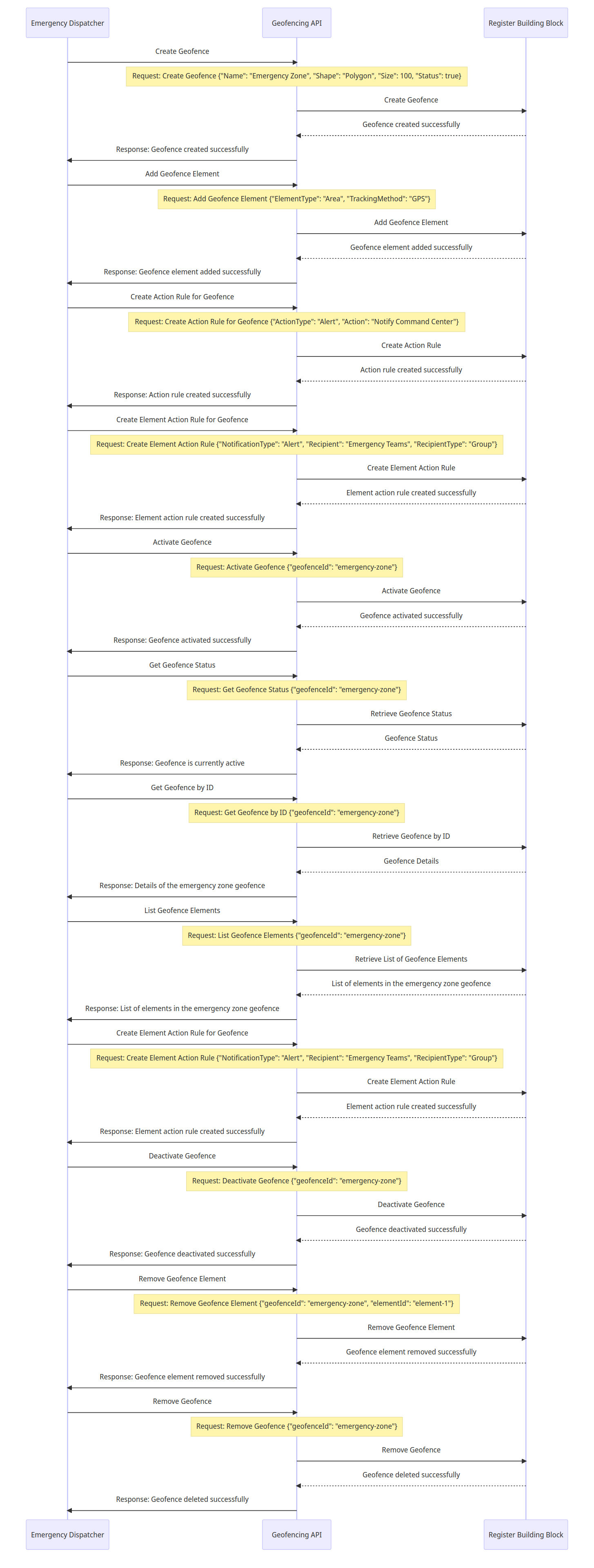
#### 9.7.2 Example: Geofencing API Usage for Redlining Emergency Operation
{% @mermaid/diagram content="sequenceDiagram
participant Dispatcher as Emergency Dispatcher
participant GeofencingAPI as Geofencing API
participant RegisterBB as Register Building Block
Dispatcher->>GeofencingAPI: Create Geofence
Note over GeofencingAPI: Request: Create Geofence {"Name": "Emergency Zone", "Shape": "Polygon", "Size": 100, "Status": true}
GeofencingAPI->>RegisterBB: Create Geofence
RegisterBB-->>GeofencingAPI: Geofence created successfully
GeofencingAPI->>Dispatcher: Response: Geofence created successfully
Dispatcher->>GeofencingAPI: Add Geofence Element
Note over GeofencingAPI: Request: Add Geofence Element {"ElementType": "Area", "TrackingMethod": "GPS"}
GeofencingAPI->>RegisterBB: Add Geofence Element
RegisterBB-->>GeofencingAPI: Geofence element added successfully
GeofencingAPI->>Dispatcher: Response: Geofence element added successfully
Dispatcher->>GeofencingAPI: Create Action Rule for Geofence
Note over GeofencingAPI: Request: Create Action Rule for Geofence {"ActionType": "Alert", "Action": "Notify Command Center"}
GeofencingAPI->>RegisterBB: Create Action Rule
RegisterBB-->>GeofencingAPI: Action rule created successfully
GeofencingAPI->>Dispatcher: Response: Action rule created successfully
Dispatcher->>GeofencingAPI: Create Element Action Rule for Geofence
Note over GeofencingAPI: Request: Create Element Action Rule {"NotificationType": "Alert", "Recipient": "Emergency Teams", "RecipientType": "Group"}
GeofencingAPI->>RegisterBB: Create Element Action Rule
RegisterBB-->>GeofencingAPI: Element action rule created successfully
GeofencingAPI->>Dispatcher: Response: Element action rule created successfully
Dispatcher->>GeofencingAPI: Activate Geofence
Note over GeofencingAPI: Request: Activate Geofence {"geofenceId": "emergency-zone"}
GeofencingAPI->>RegisterBB: Activate Geofence
RegisterBB-->>GeofencingAPI: Geofence activated successfully
GeofencingAPI->>Dispatcher: Response: Geofence activated successfully
Dispatcher->>GeofencingAPI: Get Geofence Status
Note over GeofencingAPI: Request: Get Geofence Status {"geofenceId": "emergency-zone"}
GeofencingAPI->>RegisterBB: Retrieve Geofence Status
RegisterBB-->>GeofencingAPI: Geofence Status
GeofencingAPI->>Dispatcher: Response: Geofence is currently active
Dispatcher->>GeofencingAPI: Get Geofence by ID
Note over GeofencingAPI: Request: Get Geofence by ID {"geofenceId": "emergency-zone"}
GeofencingAPI->>RegisterBB: Retrieve Geofence by ID
RegisterBB-->>GeofencingAPI: Geofence Details
GeofencingAPI->>Dispatcher: Response: Details of the emergency zone geofence
Dispatcher->>GeofencingAPI: List Geofence Elements
Note over GeofencingAPI: Request: List Geofence Elements {"geofenceId": "emergency-zone"}
GeofencingAPI->>RegisterBB: Retrieve List of Geofence Elements
RegisterBB-->>GeofencingAPI: List of elements in the emergency zone geofence
GeofencingAPI->>Dispatcher: Response: List of elements in the emergency zone geofence
Dispatcher->>GeofencingAPI: Create Element Action Rule for Geofence
Note over GeofencingAPI: Request: Create Element Action Rule {"NotificationType": "Alert", "Recipient": "Emergency Teams", "RecipientType": "Group"}
GeofencingAPI->>RegisterBB: Create Element Action Rule
RegisterBB-->>GeofencingAPI: Element action rule created successfully
GeofencingAPI->>Dispatcher: Response: Element action rule created successfully
Dispatcher->>GeofencingAPI: Deactivate Geofence
Note over GeofencingAPI: Request: Deactivate Geofence {"geofenceId": "emergency-zone"}
GeofencingAPI->>RegisterBB: Deactivate Geofence
RegisterBB-->>GeofencingAPI: Geofence deactivated successfully
GeofencingAPI->>Dispatcher: Response: Geofence deactivated successfully
Dispatcher->>GeofencingAPI: Remove Geofence Element
Note over GeofencingAPI: Request: Remove Geofence Element {"geofenceId": "emergency-zone", "elementId": "element-1"}
GeofencingAPI->>RegisterBB: Remove Geofence Element
RegisterBB-->>GeofencingAPI: Geofence element removed successfully
GeofencingAPI->>Dispatcher: Response: Geofence element removed successfully
Dispatcher->>GeofencingAPI: Remove Geofence
Note over GeofencingAPI: Request: Remove Geofence {"geofenceId": "emergency-zone"}
GeofencingAPI->>RegisterBB: Remove Geofence
RegisterBB-->>GeofencingAPI: Geofence deleted successfully
GeofencingAPI->>Dispatcher: Response: Geofence deleted successfully
" %}
### 9.8 Routing
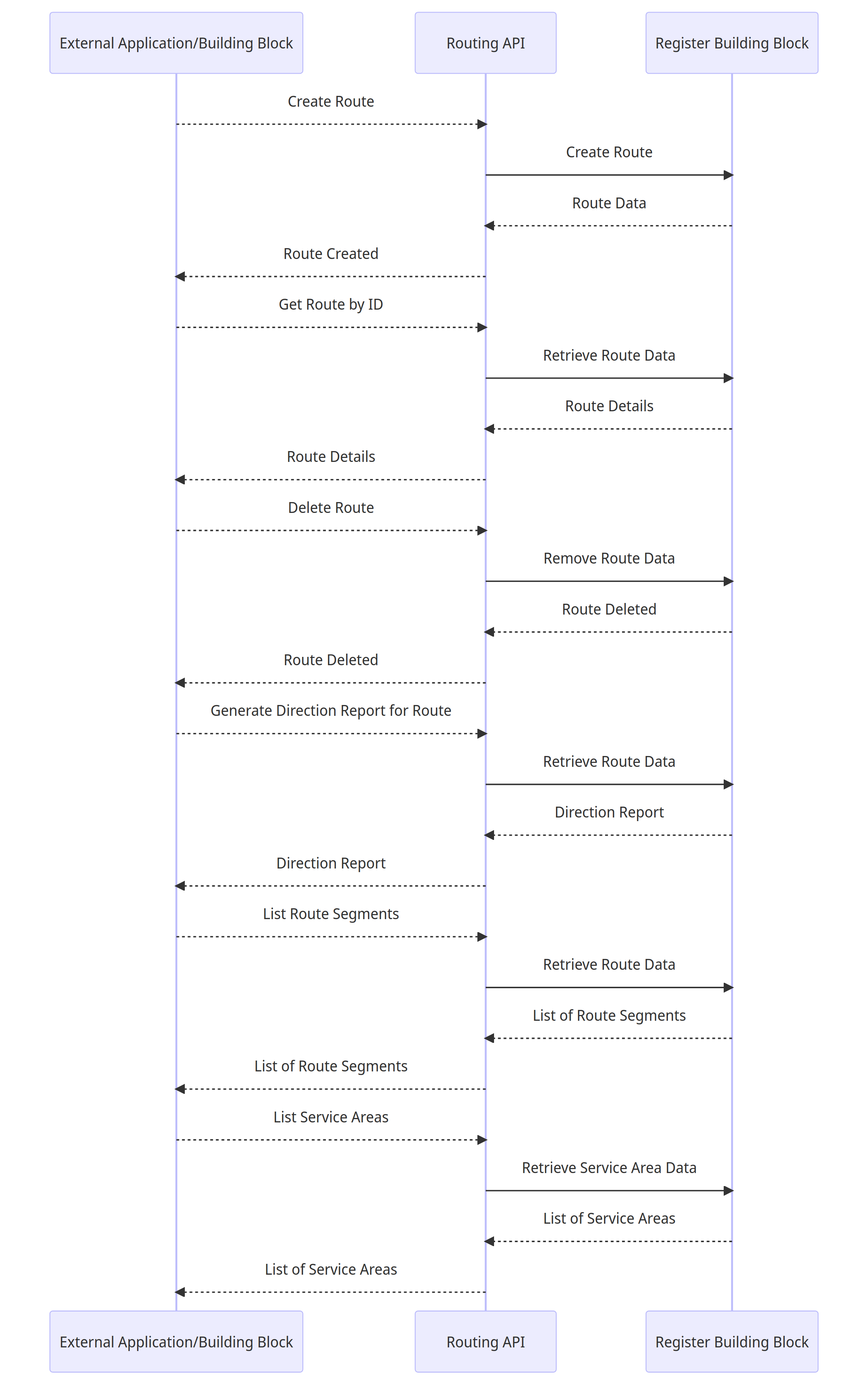
#### 9.8.1 Interactions between an external application or a Building Block and the Routing API
{% @mermaid/diagram content="sequenceDiagram
participant ExternalApp as External Application/Building Block
participant API as Routing API
participant RegisterBB as Register Building Block
ExternalApp-->>API: Create Route
API->>RegisterBB: Create Route
RegisterBB-->>API: Route Data
API-->>ExternalApp: Route Created
ExternalApp-->>API: Get Route by ID
API->>RegisterBB: Retrieve Route Data
RegisterBB-->>API: Route Details
API-->>ExternalApp: Route Details
ExternalApp-->>API: Delete Route
API->>RegisterBB: Remove Route Data
RegisterBB-->>API: Route Deleted
API-->>ExternalApp: Route Deleted
ExternalApp-->>API: Generate Direction Report for Route
API->>RegisterBB: Retrieve Route Data
RegisterBB-->>API: Direction Report
API-->>ExternalApp: Direction Report
ExternalApp-->>API: List Route Segments
API->>RegisterBB: Retrieve Route Data
RegisterBB-->>API: List of Route Segments
API-->>ExternalApp: List of Route Segments
ExternalApp-->>API: List Service Areas
API->>RegisterBB: Retrieve Service Area Data
RegisterBB-->>API: List of Service Areas
API-->>ExternalApp: List of Service Areas
" %}
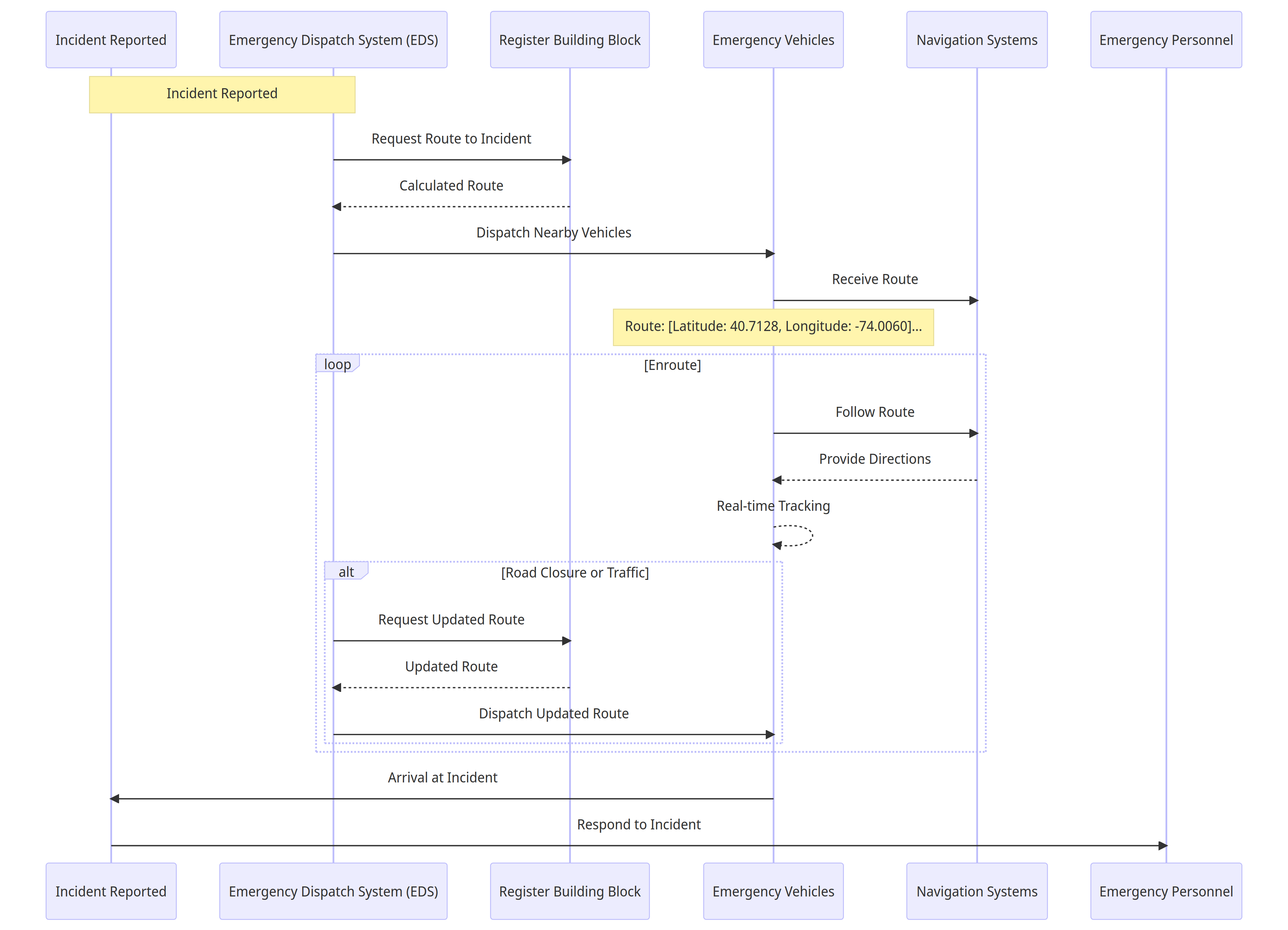
#### 9.8.2 Example: **Emergency Response Routing Scenario**
{% @mermaid/diagram content="sequenceDiagram
participant IncidentReport as Incident Reported
participant EDS as Emergency Dispatch System (EDS)
participant RegisterBB as Register Building Block
participant Vehicles as Emergency Vehicles
participant NavigationSystem as Navigation Systems
participant Personnel as Emergency Personnel
Note over IncidentReport, EDS: Incident Reported
EDS->>RegisterBB: Request Route to Incident
RegisterBB-->>EDS: Calculated Route
EDS->>Vehicles: Dispatch Nearby Vehicles
Vehicles->>NavigationSystem: Receive Route
Note over Vehicles: Route: \[Latitude: 40.7128, Longitude: -74.0060]...
loop Enroute
Vehicles->>NavigationSystem: Follow Route
NavigationSystem-->>Vehicles: Provide Directions
Vehicles-->>Vehicles: Real-time Tracking
alt Road Closure or Traffic
EDS->>RegisterBB: Request Updated Route
RegisterBB-->>EDS: Updated Route
EDS->>Vehicles: Dispatch Updated Route
end
end
Vehicles->>IncidentReport: Arrival at Incident
IncidentReport->>Personnel: Respond to Incident
" %}